Bulk file renamer
Rename a whole folder in the time it takes to rename one file.
Set your rules once, watch every new name appear next to the old one, then run it — on iPhone, iPad, or Mac.
Coming soon to the App Store
iPhone · iPad · Mac — requires iOS 26, iPadOS 26, or macOS 26

Live preview, before you run anything
DSC_0412.jpg
→
Summer Trip 001.jpg
DSC_0415.jpg
→
Summer Trip 002.jpg
DSC_0418.jpg
→
Summer Trip 003.jpg
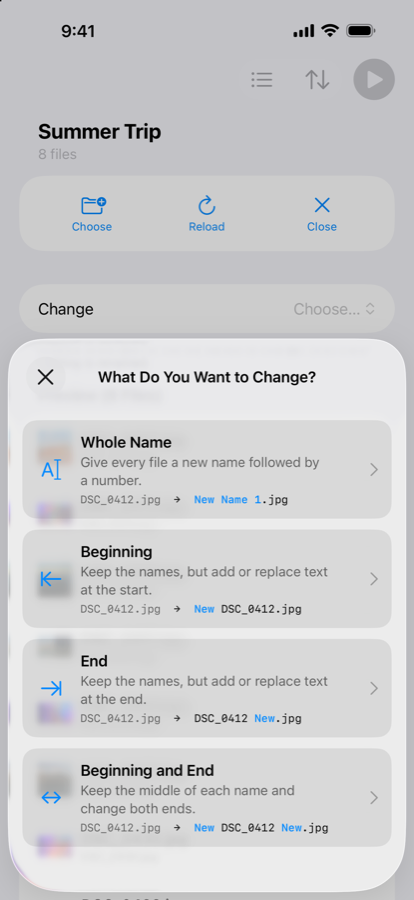
Change the whole name, or just the ends.
Pick Whole Name, Beginning, End, or Beginning and End — NameSake only ever touches the part you tell it to.
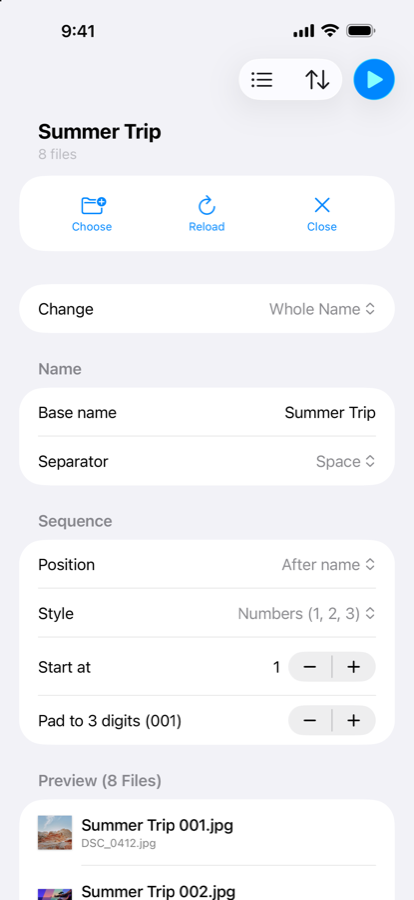
Names and numbers, exactly your way.
Set your rules and watch the preview update instantly — every new name shown next to the one it's replacing, before anything changes.
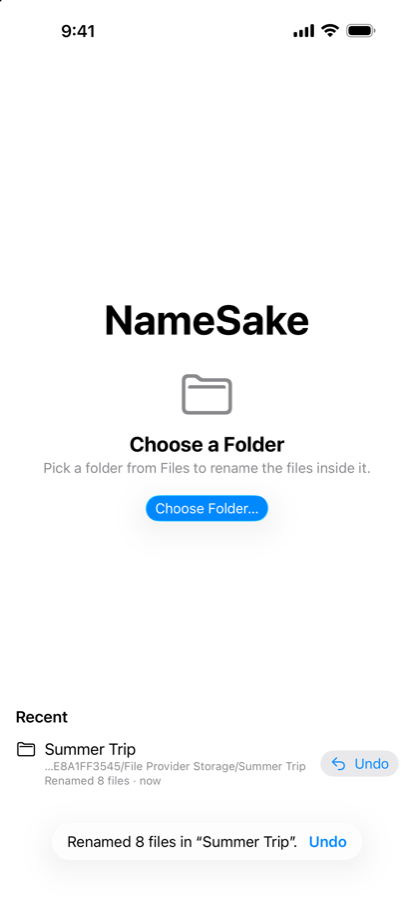
Changed your mind? Undo, even later.
Every rename can be undone — right after running it, or later from Recent, even after closing the app entirely.
Nothing leaves your device.
NameSake doesn't collect any information about you. No accounts, no analytics, no tracking — and it doesn't connect to the internet at all.
Read the full privacy policy →